Creating entertaining dance videos no longer requires professional editing skills or recording equipment. Viggle AI Free allows users to animate photographs using artificial intelligence and ready-made motion templates. With a simple image and dance reference, anyone can produce short character animations for social media, personal projects, or creative experiments without purchasing expensive animation software.
What Is Viggle AI Free?
Viggle AI is an AI-powered character animation platform that transforms still images into moving videos. Users can upload photographs, illustrations, or digital characters and apply movements from existing footage.
The platform uses AI motion technology to recreate actions such as dancing, walking, and jumping. Its free plan provides daily refreshing credits, making it accessible to people interested in testing AI-generated animations without an immediate subscription.
How Does Viggle AI Work?
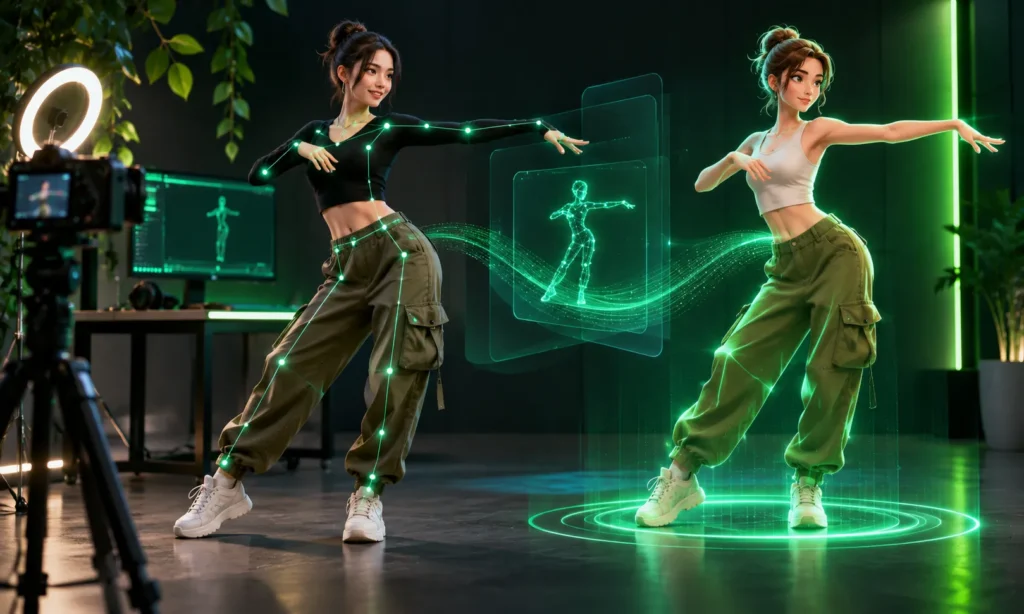
Viggle uses motion transfer technology to apply movements from a reference video to another character. The uploaded image determines the character’s appearance, while the selected template provides the movement pattern.
The system generates animated frames that follow the reference choreography. However, results depend on image clarity, body positioning, and movement complexity. Simple dances generally produce more consistent animations than complicated movements involving rapid turns or overlapping limbs.
How to Use Viggle AI Free
Creating a dance animation takes only a few steps. The platform provides an accessible interface, allowing users to generate videos without previous animation experience.
- Visit Viggle AI: Open viggle.ai and access the video creation tool. Sign in or register if prompted.
- Choose a motion: Select an available dance template or upload your own reference video through the Mix feature.
- Upload your image: Choose a clear photograph or illustration showing the character you want to animate.
- Generate the video: Click the creation button and allow Viggle to process the image and reference movement.
- Preview and download: Review the completed animation and save it if the movements appear satisfactory.
For better results, begin with a full-body photograph showing clearly visible arms and legs. Images with minimal background distractions usually provide more reliable character positioning.
Key Features of Viggle AI Free
Viggle includes several practical tools for creating character-based videos. Its main features focus on simplifying animation while giving creators flexibility over movements and character appearance.
- AI motion transfer: Applies movements from existing videos to uploaded characters.
- Viggle Mix: Replaces a character in reference footage with a selected image.
- Motion templates: Provides predefined movements for dance and entertainment videos.
- Multi-character editing: Supports animations involving multiple characters, subject to plan restrictions.
- Custom video uploads: Allows users to provide motion references.
- Video downloads: Saves completed animations for editing or sharing.
These features make Viggle useful for producing animated memes, personalized dance clips, and short entertainment videos.
Is Viggle AI Completely Free?
Viggle AI offers a free plan, although usage is limited. Free credits refresh daily, and users can generate one video at a time. The allowance depends on the credits required by the selected generation feature.
Free accounts also include limited multi-character editing and Real-Time Swap access. Generated assets remain stored for seven days, making it important to download completed projects promptly.
Paid subscriptions provide additional credits, faster processing, and watermark-free exports.
Viggle AI Free vs Paid Plans
Viggle offers Free, Pro, Live, and Max subscriptions. Each plan provides different generation limits, storage options, and editing capabilities.
| Plan | Monthly Credits | Simultaneous Videos | Storage |
|---|---|---|---|
| Free | Daily free credits | 1 | 7 days |
| Pro | 80 | 4 | Permanent |
| Live | 200 | 6 | Permanent |
| Max | 800 | 10 | Permanent |
Pro starts at $7.99 monthly with annual billing, while Live starts at $15.99 and Max at $63.99 under the same billing arrangement. Regular monthly subscriptions cost more.
For updated prices and restrictions, consult the official Viggle pricing page.
Benefits of Using Viggle AI
Viggle’s main advantage is its straightforward animation process. Users can experiment with movement without manually editing individual video frames or learning complicated software.
The platform also saves preparation time through existing motion templates. Content creators can produce humorous dance clips, animate original characters, or test visual ideas quickly. However, complex animations may still require additional editing to achieve professional results.
Tips for Better Dance Videos
High-quality source images make a noticeable difference when generating AI animations. Clear body proportions help the software interpret character positioning more accurately.
For improved results:
- Choose sharp, well-lit photographs.
- Use full-body images whenever possible.
- Avoid photographs with hidden hands or feet.
- Select dance templates with stable camera angles.
- Start with simple movements before testing complicated choreography.
If an animation looks distorted, try another photograph or motion reference rather than repeatedly generating identical inputs.
Common Problems and Fixes
AI animation occasionally produces unexpected results. Most basic issues involve unsuitable images, exhausted credits, or temporary processing problems.
Generation failures: Check available credits, internet connectivity, and supported upload formats.
Unnatural movements: Use clearer images and less complicated dance references.
Download issues: Confirm that processing has finished and check browser download permissions.
Free users should also remember the seven-day storage restriction and save important videos before they expire.
Creative Uses for Viggle AI
Viggle works particularly well for short, character-focused entertainment. Social media creators can animate original avatars, develop dance memes, or produce humorous videos for Instagram Reels and TikTok.
Digital artists may also use the platform to test movements for illustrated characters. Businesses can experiment with animated mascots, provided they own the necessary image rights and follow applicable commercial-use conditions.
Is Viggle AI Safe?
Viggle processes uploaded photographs and videos, so users should review its privacy policy before submitting personal content.
Avoid uploading sensitive images or animating identifiable people without their permission. Copyright also matters when using existing dance footage, music, or protected characters.
Responsible use helps prevent privacy violations, misleading impersonations, and unauthorized reuse of creative material.
Viggle AI Alternatives
Other platforms offer similar AI-assisted video creation features.
Vidnoz AI Dance Generator focuses on turning photographs into dancing characters using predefined animations. CapCut combines AI animation templates with broader video editing capabilities.
Dreamina provides generative video tools for creating animated scenes from images and prompts. The best option depends on whether the project requires dance motion transfer, creative scene generation, or detailed video editing.
Frequently Asked Questions
Is Viggle AI Free to Use?
Yes, Viggle AI Free allows users to create AI-generated dance videos without purchasing a subscription. However, free accounts have daily usage limits, restricted features, and limited video storage.
How Can I Make a Dance Video Using Viggle AI?
Visit the Viggle AI website, choose a dance template, and upload a clear photograph. The platform applies the selected movements to your character. Once processing finishes, you can preview and download the animated video.
Can I Use Viggle AI Free on My Phone?
Yes, Viggle AI can be accessed through compatible mobile browsers. Mobile app availability and features may vary depending on your device and region.
Does Viggle AI Free Add Watermarks to Videos?
Yes, free exports may include a Viggle watermark. Users who want watermark-free videos can consider upgrading to a paid subscription that includes this feature.
What Are the Best Free Alternatives to Viggle AI?
Vidnoz AI Dance Generator, CapCut, and Dreamina are popular alternatives. Vidnoz focuses on photo-based dance animations, while CapCut offers editing tools and Dreamina supports AI-generated video creation.
Is Viggle AI Free Worth Trying?
Viggle AI Free is a useful starting point for experimenting with AI dance videos without paying for animation software. Its motion templates, image uploads, and accessible workflow suit casual creators and short social media projects.
Start with a clear full-body image and simple dance template. If daily credits, storage restrictions, or watermarks become inconvenient, consider upgrading after evaluating the free results.