Janitor AI is a character-based chatbot platform that allows users to chat with fictional personalities, create custom characters, and enjoy interactive storytelling. Unlike traditional AI assistants, it focuses on personalized conversations and creative roleplay.
Learning how to use Janitor AI is relatively simple. You can create an account, choose a character, and start chatting without advanced technical knowledge. This guide covers the setup process, character creation, API settings, pricing, safety, and common troubleshooting solutions.
What Is Janitor AI?
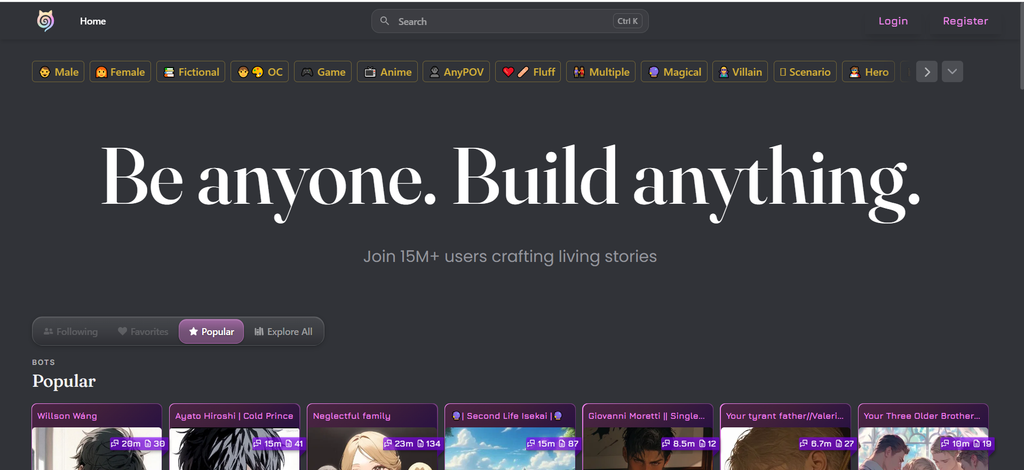
Janitor AI is an AI-powered chatting platform where users interact with characters designed around specific personalities, backgrounds, and fictional scenarios. Launched in 2023, it became popular for its customizable characters and storytelling features.
Users can explore community-created characters or develop their own. Common uses include fictional adventures, creative writing, casual conversations, and roleplay.
The platform is intended for adults because some user-generated content contains mature themes.
How Does Janitor AI Work?
Janitor AI uses large language models (LLMs) to generate responses based on user messages and character settings. Each character has instructions describing its personality, behavior, and conversational style.
For example, a detective character might respond to clues, investigate fictional mysteries, and maintain a serious speaking style.
Janitor AI supports its native JanitorLLM system and compatible external AI models. However, conversation quality depends on the selected model, character instructions, and available chat context.
How to Use Janitor AI: Step-by-Step
Getting started requires only a few basic steps. Beginners should try an existing character before creating their own.
- Visit the official website: Open janitorai.com using your preferred browser.
- Create an account: Select the registration option and follow the instructions. Complete any required verification and customize your profile.
- Choose a character: Browse available characters or search for a particular personality. Read the character description to understand its background and intended scenario.
- Start chatting: Open the character’s conversation page and send your first message. The AI will respond according to its configured personality.
- Explore chat settings: Adjust available options such as response regeneration, editing, or model selection when needed.
For example, you could begin a detective roleplay with: “I found a mysterious letter outside my apartment. Can you help me investigate?”
This gives the character a clear situation and helps establish a natural conversation.
How to Create a Character on Janitor AI
Janitor AI allows users to develop original characters with customized personalities and stories.
Open the character creation section and complete the available fields:
- Character name: Choose a suitable fictional identity.
- Description: Explain the character’s background and appearance.
- Personality: Define important traits, behavior, and speaking style.
- Scenario: Describe the setting or fictional situation.
- Opening message: Write an engaging conversation starter.
- Image and visibility: Add a suitable picture and choose available privacy settings.
For instance, you could create a space explorer who discovers unfamiliar planets and invites users to join adventures.
After saving, test the character through a conversation. Adjust its description or personality instructions if the responses feel inconsistent.
How to Set Up Janitor AI API
An API connects Janitor AI with compatible external language models. However, an external API key is not necessarily required because the platform offers native model options.
If you prefer an external provider, the general setup involves:
- Open the chat model or API settings.
- Select a supported AI provider.
- Obtain the required API credentials.
- Enter the connection details.
- Save the settings and test a conversation.
External services may charge according to usage, so review their current pricing before connecting an account.
Never share your API key or enter it into unfamiliar third-party websites. Unverified reverse proxies may introduce security and privacy risks.
How to Use Janitor AI on Mobile
Janitor AI works through mobile browsers, allowing users to access characters and conversations without a computer.
The platform also offers an official application called Janitor: Interactive Stories, listed on supported mobile app stores.
Mobile users can browse characters, manage conversations, and access available customization options. However, certain settings may differ between the website and application.
For security, install the application through official stores rather than unofficial download websites.
Is Janitor AI Free?
Janitor AI provides free character-chatting options through its native system. Users can explore conversations and character creation without necessarily purchasing external API access.
However, some features and services may involve additional charges.
| Feature | Availability |
|---|---|
| Basic character chatting | Free options |
| Character creation | Available |
| User personas | Available |
| Native JanitorLLM | Free options |
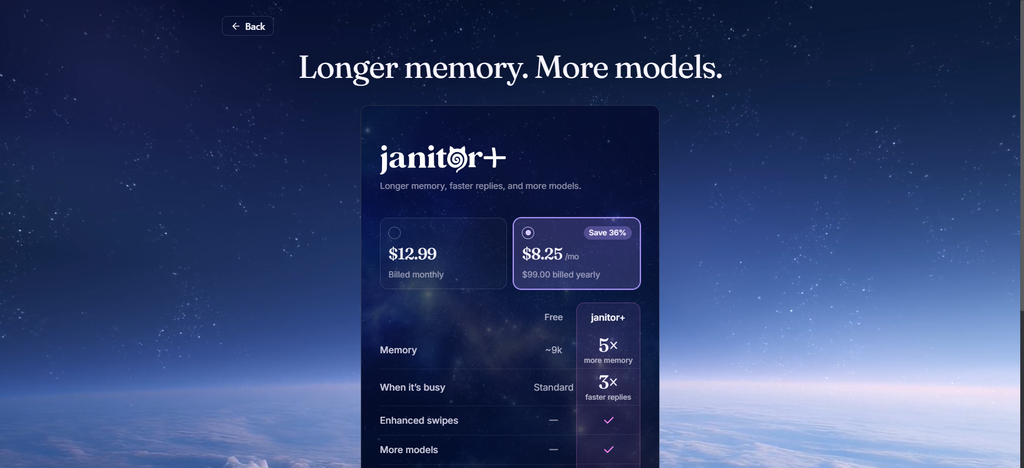
| Janitor+ subscription | Paid |
| External AI APIs | Provider-dependent costs |
Janitor+ offers additional subscription benefits, while third-party models may have separate usage charges. Check official pricing information before upgrading.
Tips for Better Conversations
A few practical habits can improve your Janitor AI experience.
- Provide context: Explain the setting and situation before beginning a detailed conversation.
- Use clear messages: Avoid complicated instructions containing several unrelated requests.
- Create a persona: Define your fictional identity to make roleplay more consistent.
- Regenerate responses: Try another reply when the character behaves unexpectedly.
- Maintain story details: Remind characters of important events during longer conversations.
Remember that AI characters may occasionally forget information or produce inconsistent responses, especially during extended chats.
Common Janitor AI Problems
Technical issues can sometimes interrupt conversations. Fortunately, several problems have straightforward troubleshooting steps.
Website not loading: Refresh the page, check your connection, or try another browser. Official announcements may help identify service interruptions.
Characters not responding: Retry the message, regenerate the response, or check the selected AI model.
API errors: Verify your credentials, provider settings, and available account balance.
Login problems: Confirm your sign-in method and complete any required verification.
Characters forgetting details: Restate important information or use available conversation-memory tools.
Is Janitor AI Safe?
Janitor AI can be used responsibly, but privacy and content awareness are important.
Avoid sharing passwords, financial information, private addresses, or sensitive personal details during conversations. Review character descriptions because community-created content may include mature subjects.
Always use official platform links and understand that AI-generated responses can contain incorrect information.
Frequently Asked Questions
Can I use Janitor AI without paying?
Yes. Free chatting options are available through the platform’s native model system.
Do I need an API key for Janitor AI?
No. An API key is generally needed only when connecting compatible external AI providers.
Can I create my own AI character?
Yes. You can customize a character’s name, personality, background, scenario, and opening message.
Why is Janitor AI not responding?
Possible reasons include server problems, connection issues, model delays, or incorrect API settings.
Can I use Janitor AI on my phone?
Yes. Janitor AI is accessible through mobile browsers and its official mobile application.
Getting Started With Janitor AI
Understanding how to use Janitor AI begins with choosing a character and starting a simple conversation. Once you’re comfortable with the interface, explore character creation, personas, and available model settings.
For beginners, the best approach is to use the native chat options first and consider advanced API configurations only when necessary.
